
Key takeaways
- The manual approach does not scale. Checking individual insurance rules appointment by appointment wastes administrative hours and constantly invites human error.
- Software that lets you set billing rules at the payer level automatically applies authorization limits, modifiers, and billing codes across every matching client.
- Clean billing starts at scheduling. Moving compliance checks to the front of the workflow protects your revenue at the source. When schedulers and providers see authorization limits and clinical rules in real time, mistakes don’t make it to the billing desk.
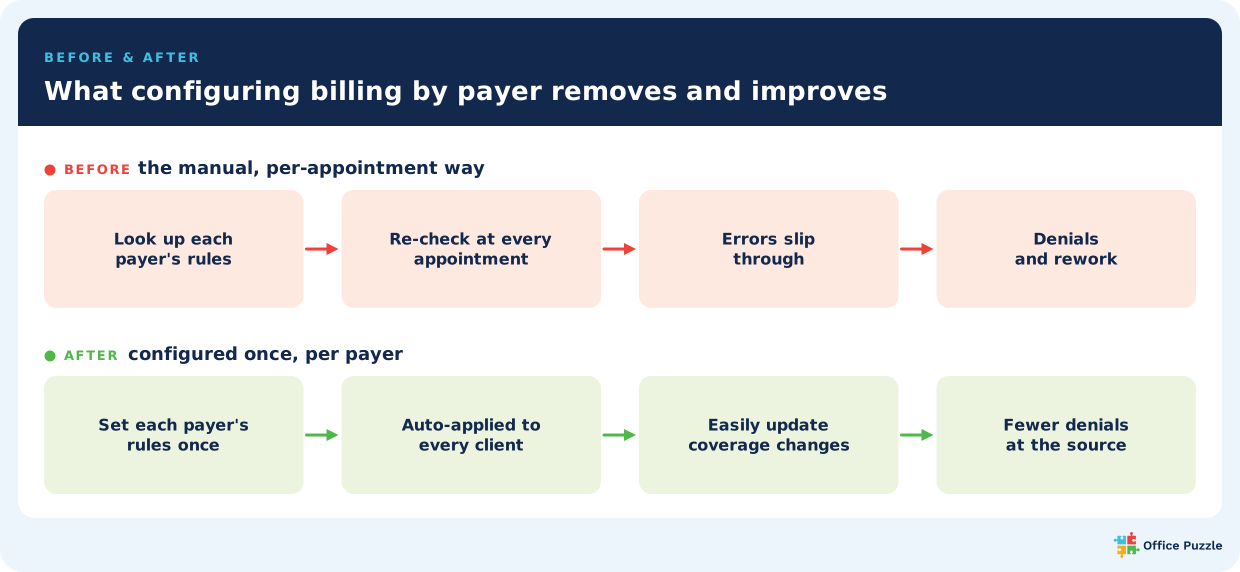
Most insurance payers have different rules, and traditional workflows force your team to re-verify those rules appointment by appointment. There’s a different way. Leveraging software with payer configuration allows you to input each payer's specific rules a single time and then automates your entire claim verification process from there.
For a growing multi-payer practice, this system can determine whether your billing operation scales smoothly or gets bogged down by administrative overhead. Read more to learn about this configuration technique and how it can help your practice operate more smoothly.
The multi-payer compliance problem
Because every insurance company has its own rules, managing a growing practice requires constant vigilance at every stage of care. The fact that these rules vary is well-documented across the industry. Federal guidelines like the CMS National Correct Coding Initiative establish baseline requirements, but state-level policies like the Virginia DMAS ABA policy manual add entirely different sets of criteria for the same services.
A manual tracking system can work fine when you only manage three clients and a single payer. However, once you grow to 30 clients across 5 different insurance companies with coverage terms that change mid-year, the manual approach breaks down.
Denials need to be stopped before billing cycles
The reality is that clean billing starts with scheduling. Billing rejections at the end of the month almost always originate weeks earlier. If a scheduler approves an appointment that exceeds an authorization cap, or a provider misses a clinical rule during a session, the claim is already compromised before it ever reaches the billing desk.
A single billing expert at the end of the line shouldn't be tasked to catch and fix every mistake. To support compliance, your scheduler needs to know the authorization limits, your providers need to know the documentation rules, and your billers need the correct codes. When the entire team has to memorize and track all of this manually, human error can result in lost revenue. You can read more about tracking these operational leaks in our reducing aba claim denials blog.
How per-payer configuration works
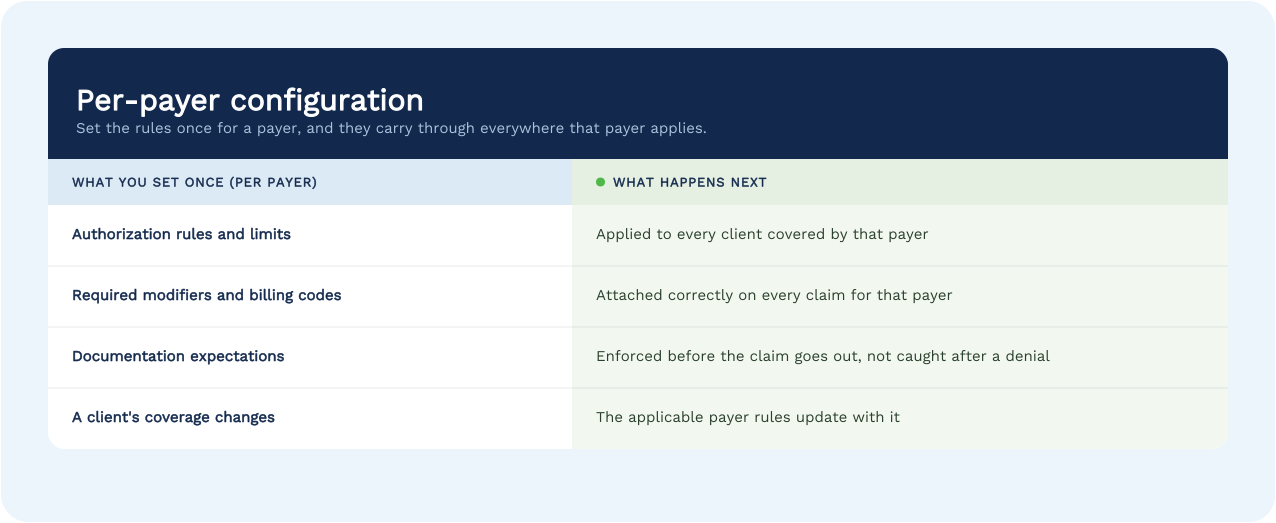
Per-payer configuration embeds compliance rules into every phase of the client experience. Because clean billing starts at the scheduling desk, this setup provides real-time guardrails for the scheduler, the provider, and the biller simultaneously.
Setting rules at the insurance provider level creates a single source of truth that automates checks across the entire practice workflow.
What this removes: the before and after
The value is easiest to see as a before and after.
What it's worth as you scale
The payer structure is messy, and the guesswork resulting in errors and re-work costs owners even more as their practice grows. Operational complexity grows exponentially because you’re multiplying your total client count by your total number of insurance providers, and then multiplying that by how often coverage terms shift mid-year.
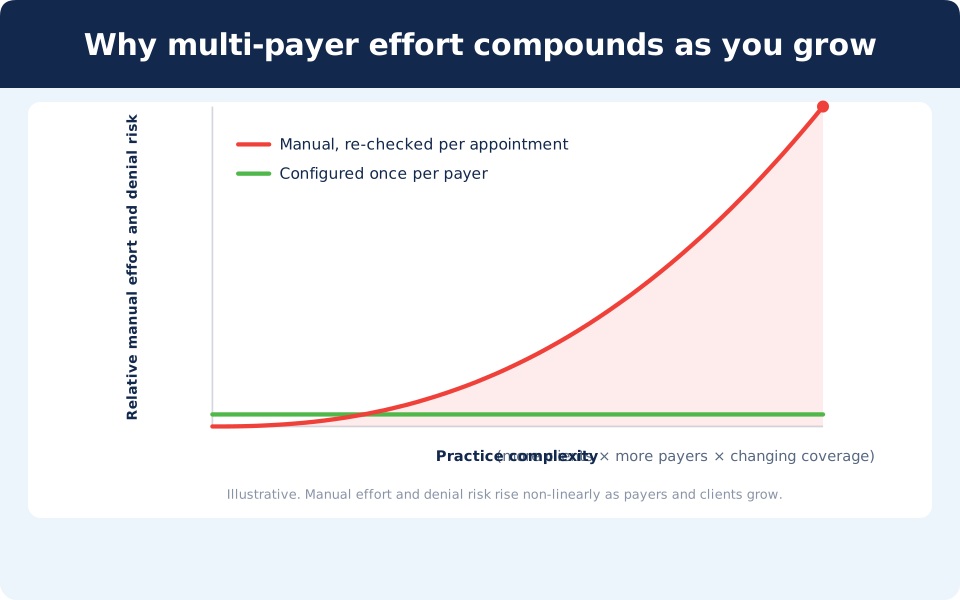
Each new payer contract you sign adds an entire matrix of rules your team must memorize and execute. Without automation, your denial risk can rise faster than your client count.
Managing rules at the insurance provider level keeps the setup work limited to a handful of accounts. This structure supports compliance by saving staff hours and protecting cash flow. It also serves as an excellent compliance asset by ensuring your records consistently match payer expectations during unexpected audits, a topic we explore deeply in our overview of ABA session note compliance.
How Office Puzzle helps
When you’re running your own practice, and especially when you have a smaller staff, it’s important that you can modify your payer settings without having to submit a support ticket. And, it’s vital that your payer settings apply seamlessly from scheduling to billing, not just at the claim stage.
Office Puzzle fully connects scheduling, clinical data, session notes, and billing inside a single platform. A payer rule established in your settings protects every touchpoint, from the initial appointment slot to the electronic claim.
We believe software should be accessible for growing practices. You get a unified system for one straightforward monthly price: under $20 per user with every feature included. See how much you can save with our cost savings calculator.
The best way to see if this removes your team's administrative guesswork is to set up a payer profile yourself. You can test drive Office Puzzle completely free for 30 days with no credit card required and no contract. If you would prefer a guided walkthrough first, book a live demo.
Frequently asked questions
What is per-payer billing configuration in ABA software?
Per-payer billing configuration means setting each insurance payer's billing requirements once, including authorization rules, modifiers, and documentation expectations, so the software applies them automatically to every client covered by that payer. Instead of re-entering or re-checking the rules for each appointment, you configure the payer once and the system enforces it across the board.
Do I have to set billing rules for every client individually?
No. That's the point of per-payer configuration. You set the rules once at the payer level, and they apply automatically to every client on that insurance. When a client's coverage changes, the applicable rules update with it, so you're not reconfiguring client by client.
How does per-payer configuration reduce claim denials?
Many denials come from billing a service that didn't match a payer's specific rules: a missing modifier, an authorization limit, a documentation requirement. Applying each payer's rules automatically, before the claim goes out, removes a whole category of those errors at the source rather than catching them after a denial.
Does Office Puzzle make me sign a contract or sit through a demo to try this?
No. Office Puzzle offers a 30-day free trial with no credit card required and no mandatory demo, and there are no long-term contracts. You can try the billing configuration yourself before talking to anyone.
Is this useful for a single-payer practice, or only multi-payer?
It helps any practice, but the value compounds with complexity. A single-payer practice still benefits from setting rules once and applying them automatically. The more payers and clients you manage, the more per-appointment guesswork it removes, which is why it matters most for practices that are growing or already juggling several payers.
Sources
- Centers for Medicare & Medicaid Services. (2026). National Correct Coding Initiative (NCCI). U.S. Department of Health and Human Services. https://www.cms.gov/national-correct-coding-initiative-ncci
- Virginia Department of Medical Assistance Services. (2024). Applied behavior analysis (ABA) policy and regulatory clarifications. Commonwealth of Virginia. https://vamedicaid.dmas.virginia.gov/bulletin/applied-behavior-analysis-aba-policy-and-regulatory-clarifications
- Office Puzzle. (2026, June 24). Per-payer billing configuration feature [Internal product documentation].