
Most ABA practice owners find out something is wrong with billing weeks after the mistake happened. The flag is usually one of the following:
- denied claim
- delayed payment
- expired authorization
At first glance, each of these issues appears to point to the root problem: an issue with the claim itself, the biller, or maybe the software.
In reality, the problem started much earlier, in a step that had nothing to do with sending the claim. That gap, between where a billing problem shows up and where it first began, is why revenue cycle management matters. It's also why so many owners feel like they're always chasing money that should already be in the books.
Want to know more about how money really moves through your ABA practice? Read on to learn what revenue cycle management is, how it connects to billing, and why a biller, billing process, and billing software are three different things a practice needs working together.
Key takeaways
- Revenue cycle management (RCM) is the full process of getting paid for care, from a client's first intake and insurance check through the final paid claim. Billing is one stage of that process.
- A biller is a person, a revenue cycle is a process, and billing software is a tool. A healthy practice needs all three, and none of them replaces the others.
- Most claim denials start before a claim is ever submitted, in front-end steps like eligibility and prior authorization, so fixing billing alone rarely fixes the underlying money problem.
What is revenue cycle management in ABA?
Revenue cycle management, or RCM, is the entire process a practice uses to get paid for the care it delivers. The Healthcare Financial Management Association describes it as all the administrative and clinical work that captures, manages, and collects payment for services. In plain terms, it's every step between a family's first phone call and the last dollar collected on a claim.
The ABA practice revenue cycle management process runs from:
- intake and the first insurance check
- through authorization
- session delivery
- documentation
- coding
- claim submission
- payment
- and any denials or follow-up that come after.
Included in that list are common practice functions your team touches every day, such as scheduling, data collection, documentation, billing and compliance. RCM is the name for how all of those steps connect into one path to payment.
ABA billing vs revenue cycle management: what's the difference?
Here's the short version:
- ABA billing is the work of turning delivered services into submitted claims and collected payments.
- Revenue cycle management is the whole system that billing sits inside.
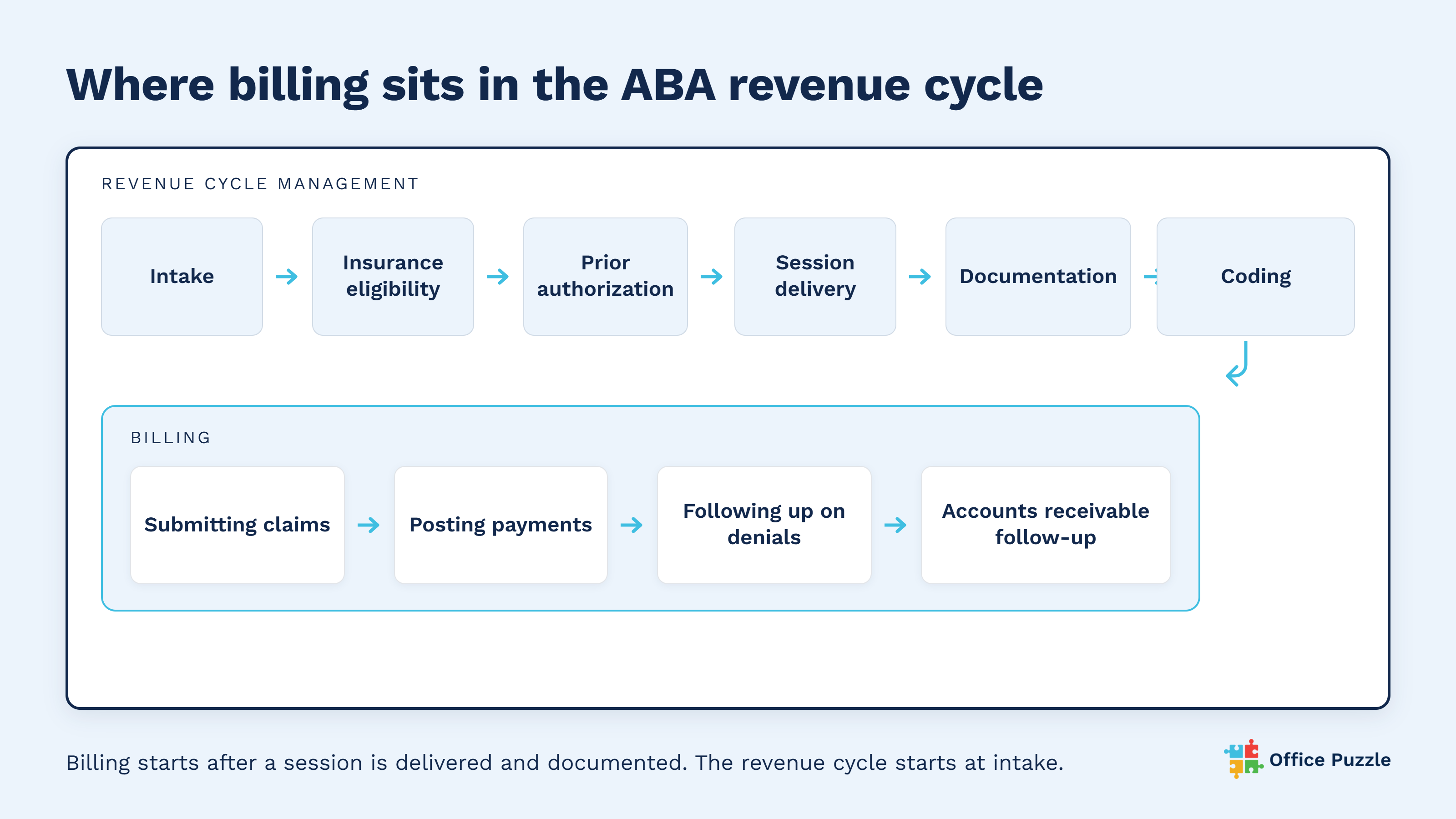
Billing is mostly back-end work: submitting claims, posting payments, following up on denials, and chasing accounts receivable. These steps happen after a session has been delivered and documented. The revenue cycle includes all of that, plus everything that comes before it: intake, insurance eligibility, prior authorization, and the documentation that has to support the claim.
The distinction matters because the two get treated as the same thing. When an owner says the billing is a mess, the fix they reach for is usually a new biller or new billing software. If claims are getting denied because eligibility wasn't checked or an authorization lapsed, the billing step was never the problem. Think of billing as one piece of the puzzle and the revenue cycle as the finished picture. You can't fix the picture by swapping one piece.
A biller, billing software, and RCM are not the same thing
This is the confusion that costs practices the most. A biller, billing software, and a revenue cycle are three different things. Mixing them up leads to hiring or buying decisions that don't solve the real problem.
The biller: a person who works part of the cycle
A biller is a person, or a team. Their job is the claims work: submitting claims, posting the payments that come back, and following up on denials and unpaid balances. A good biller keeps claims moving and money coming in.
A biller can be in-house or an external contractor, and the two fit different practices.
An in-house biller is a practice employee dedicated to your claims. They sit close to your scheduling and clinical staff, which makes it easier to catch a problem early, and they build deep familiarity with your specific payers and authorizations over time. The tradeoff is cost and coverage: a salaried role, plus a gap in claims work if that person is out or turns over.
An external biller, whether an independent contractor or a billing service, works claims for multiple practices, typically priced as a percentage of collections or a flat fee. This lowers fixed overhead and gives a practice billing expertise without hiring for it, which can suit smaller or newer practices well. The tradeoff is distance: an external biller depends on the practice's own staff to hand off clean authorization and session data, and there's usually more lag when something needs a second look.
Either way, the biller role covers the same ground. What a biller usually doesn't own is everything that happens before the claim:
- scheduling
- checking a client's eligibility before the session
- securing prior authorization
- provider credentialing
- compliance
Those steps decide whether the claim can be paid at all. When they break, even the best biller is left cleaning up errors they didn't create.
Revenue cycle management: the process that connects every step
Revenue cycle management is the process, not a person or a product. It's the connected path a claim travels, from the first intake form to the final payment. No single hire and no single tool is your revenue cycle.
A note on terms: "RCM" gets used two ways in the industry, and both are correct. In its strict sense, RCM is the process this article describes: the full path from intake to payment, regardless of who performs each step. But you'll also see "RCM service" or "RCM software" marketed as a product, usually meaning a vendor who takes on a wider slice of the cycle than a traditional biller, including benefits verification and prior authorization support, sometimes with parts of the work automated. In effect, that's a full-scope biller plugged in from the front end rather than just the back end. This guide uses RCM in its process sense throughout, since that's the concept a practice needs to understand before evaluating any vendor, service, or software claiming to "do RCM" for them.
The revenue cycle is how:
- intake
- authorization
- documentation
- coding
- billing
- and follow-up hand off to each other.
When those handoffs are clean, claims get paid the first time. When they aren't, work and money leak out at the seams.
Billing software: a tool that supports the work
Billing software is a tool that helps a practice:
- create
- submit
- and track claims in one place.
And, good billing tools cut down on manual entry and missed steps. What software can't do is make the judgment calls or work the exceptions for you, and it can't repair a process that was never set up right. Software supports the biller and the revenue cycle. It doesn't replace either one.
The difference at a glance:
|
A biller |
Billing software |
Revenue cycle management |
|
|---|---|---|---|
|
What it is |
A person or team (a role) |
A tool |
A process |
|
What it covers |
Submitting claims, posting payments, working denials, AR follow-up |
Automating and tracking billing tasks in one place |
Every step from intake and eligibility to the final paid claim |
|
In an ABA practice |
The person who sends claims and chases the unpaid ones |
The system your team enters and tracks claims in |
Intake, eligibility, authorization, documentation, coding, claims, payment, denials, and AR, connected |
|
What it can't do alone |
Fix errors that happen before the claim is created |
Make the decisions or work the exceptions for you |
Run without people and tools to carry it out |
Note: "revenue cycle management" here refers to the process, not RCM services or software marketed under the same name — see the note on terms above.
The ABA revenue cycle, stage by stage
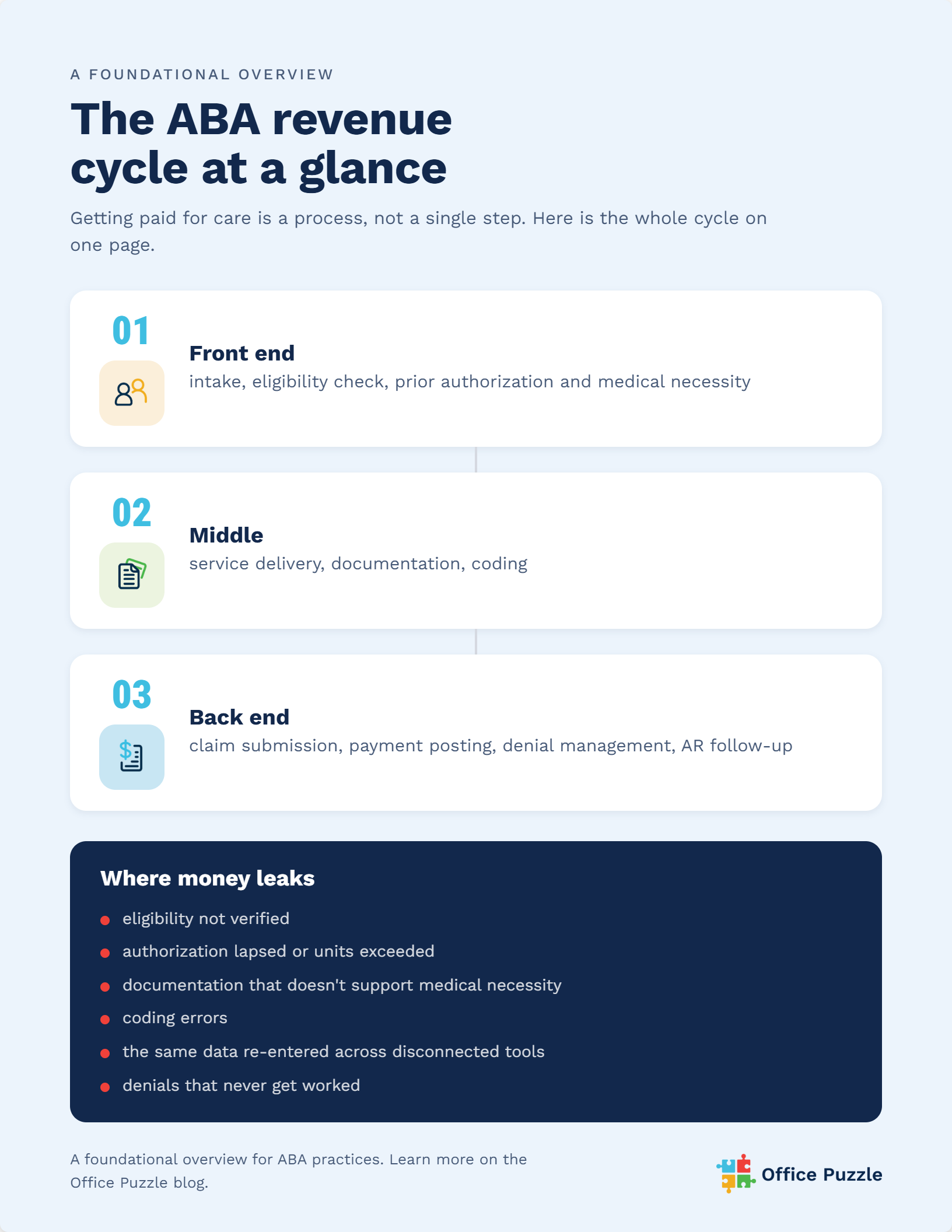
It's easier to see where money leaks once you can see the whole cycle. The ABA revenue cycle has three broad stages: the front end, the middle, and the back end. Most of what decides whether you get paid happens in the first two, before billing ever begins.
Front-end: intake, eligibility, and authorization
The front end is everything that sets a claim up to succeed.
- It starts at intake, when you build the client's account and gather demographic and insurance details.
- Next comes verifying insurance eligibility and benefits, which confirms the plan is active and covers the service.
- Then comes prior authorization. For ABA, payers generally review a treatment plan and assessment to decide whether services meet medical necessity before they approve them.
For Medicaid-funded services delivered in the home, there's one more front-end requirement. Electronic visit verification is a built-in safeguard required under the 21st Century Cures Act for in-home Medicaid services, and it confirms details like who delivered the service, where, and when. Miss any of these front-end steps and the claim is often denied weeks later, long after the session happened.
The middle: service delivery, documentation, and coding
The middle stage is where care is delivered and turned into a billable claim.
- Sessions happen and get documented
- Charges are captured
- Services are translated into the correct ABA billing codes.
Documentation has to support the medical necessity of each unit billed, because that's what a payer checks if the claim is reviewed. Weak documentation in this stage becomes a denial later.
Back-end: claims, payments, denials, and AR
The back end is what most people picture when they hear the word billing.
- Claims are submitted
- Payments are posted as they come in
- Denials are reviewed and appealed
- Unpaid claims are followed up through accounts receivable.
This is real, skilled work, and it's where a biller earns their keep. Part of that work starts long before a claim ever reaches a biller's desk. Authorization units, eligibility status, and documentation completeness are determined at scheduling and during service delivery, not at billing. By the time a claim lands in front of a biller, most of what makes it "clean" has already been decided by upstream systems and staff.
This is where a common misconception creeps in: people picture billing as a back-end function, something that happens after the real work is done. In practice, the conditions for a clean claim are set at the front end. A biller can review what's in front of them. They can't retroactively create an authorization that was never checked or a session note that was never written.
That's why the strongest practices don't treat pre-submission review as the safety net; they treat it as the last checkpoint in a system designed to catch problems early. Software that flags a lapsed authorization at the point of scheduling, not after the session was already booked, stops the error before it exists. A biller reviewing claims before submission is still valuable, but by that point, they're confirming what should already be true, not discovering it for the first time.
A clean claim is the product of good systems from the first point of contact through submission. The back-end review is real, skilled work, but it functions best as a last checkpoint, not a first line of defense. For more on one of the biggest back-end challenges, read our article on reducing ABA claim denials.
Where ABA practices lose money in the revenue cycle
Revenue leakage rarely comes from one dramatic failure. It comes from small, repeatable gaps across the cycle:
- Eligibility that wasn't verified, so the plan didn't cover the service.
- Authorizations that lapsed or ran out of approved units mid-treatment.
- Documentation that didn't support medical necessity for the units billed.
- Coding errors that trigger a denial.
- Disconnected tools that force staff to re-enter the same information, increasing errors.
- Denials that never get worked, so earned revenue ages out and becomes a write-off.
The national numbers show how much is at stake. An analysis of federal data found that HealthCare.gov plans denied nearly 1 in 5 in-network claims in 2023, and only about 6 percent of those denials were for medical necessity. The rest were administrative, coverage, or authorization issues, the kinds of problems that trace back to the front end.
Demand is climbing too, with the CDC now identifying about 1 in 31 children with autism, which means more claims, more authorizations, and more chances for a gap to cost you.
If claims are coming back, look upstream at the process that feeds billing. That's where most denials are set in motion. Hiring a biller helps you work claims faster, and better software helps you track them, but neither one closes a front-end gap on its own.
How Office Puzzle helps ABA practices manage the revenue cycle
By now the pattern is clear. A practice gets paid reliably when the whole revenue cycle works together, not when a single step is strong on its own. That's the idea Office Puzzle is built around.
Office Puzzle is an all-in-one ABA platform where scheduling, data collection, documentation, and billing tools live in the same connected platform. Because the steps share one system, information entered once flows forward. Scheduling and authorization details, session data, and documentation feed into the claim instead of being re-keyed in a separate billing system. That closes the front-end gaps where denials start, and it's what makes in-house ABA billing workable without stitching separate tools together.
For Medicaid in-home services, electronic visit verification is a built-in safeguard, so visit details are captured as part of the workflow. Billing tools are included rather than sold as a separate module, so the revenue cycle stays connected end to end.
More than 800 ABA practices nationwide run this way on Office Puzzle. You can see how the billing tools and connected workflow fit together, or review what's included on our pricing page.
If you want to see it with your own client data, book a demo or start a free 30-day trial.
Frequently asked questions
What is the difference between ABA billing and revenue cycle management?
ABA billing is the work of turning delivered services into submitted claims and collected payments, mainly claim submission, payment posting, and denial follow-up. Revenue cycle management is the entire process that billing sits inside, from intake, eligibility, and authorization through documentation, coding, claims, and accounts receivable. Billing is one stage of the revenue cycle, not a synonym for it.
Is a medical biller the same as revenue cycle management?
Not exactly, though the terms get used loosely. In the strict sense, a medical biller is a person or team who handles the claims side: submission, payment posting, and denial follow-up. Revenue cycle management is the full process from a client's intake to the final payment. That said, "RCM" is also used in the ABA industry to describe a vendor or service that does more than traditional billing, including eligibility checks and prior authorization support. When a practice sees "RCM service" advertised, that's usually a full-scope biller, not a different thing entirely.
Is billing software enough to manage an ABA revenue cycle?
Billing software helps, but it isn't enough on its own. Software is a tool that speeds up creating, submitting, and tracking claims. It can't design your process or work the exceptions, and it can't fix a front-end gap like a missed eligibility check. The strongest setups pair capable billing tools with a well-run process and the people to carry it out.
What are the stages of the ABA revenue cycle?
The ABA revenue cycle has three broad stages. The front end covers intake, eligibility verification, and prior authorization. The middle covers service delivery, documentation, and coding. The back end covers claim submission, payment posting, denial management, and accounts receivable follow-up. Most denials trace back to the front end.
Why do ABA claims get denied?
ABA claims are most often denied for administrative reasons rather than clinical ones. Common causes include unverified eligibility, lapsed or exceeded prior authorizations, documentation that doesn't support medical necessity, and coding errors. National data shows only a small share of denials are based on medical necessity, which means most are preventable with stronger front-end and documentation steps.
Sources
- American Academy of Professional Coders. (2023). Simplify the revenue cycle management process: Part 1. AAPC Knowledge Center. https://www.aapc.com/blog/55041-simplify-the-revenue-cycle-management-process/
- American Academy of Professional Coders. (n.d.). How to become a medical biller: Step by step. AAPC. https://www.aapc.com/video/series/intro-to-medical-billing/how-to-become-a-medical-biller-step-by-step
- Centers for Disease Control and Prevention. (2025). Data and statistics on autism spectrum disorder. https://www.cdc.gov/autism/data-research/index.html
- Centers for Medicare & Medicaid Services. (n.d.). Electronic visit verification. Medicaid.gov. https://www.medicaid.gov/medicaid/home-community-based-services/home-community-based-services-guidance-additional-resources/electronic-visit-verification
- Healthcare Financial Management Association. (n.d.). Revenue cycle management (RCM): What it is and how it works. https://www.hfma.org/reference/revenue-cycle-management/
- KFF. (2025). Claims denials and appeals in ACA Marketplace plans in 2023. https://www.kff.org/private-insurance/claims-denials-and-appeals-in-aca-marketplace-plans-in-2023/
- National Academies of Sciences, Engineering, and Medicine. (2024). ABA industry guidelines and standards of care. In The Comprehensive Autism Care Demonstration. NCBI Bookshelf. https://www.ncbi.nlm.nih.gov/books/NBK619293/