
Search for ABA practice management software and you'll find endless lists ranking platforms by feature count. It's easy to assume the platform with the most tools is the best choice.
But for a small or growing practice, a massive feature list can be overwhelming. A platform with hundreds of features you may not need isn't always the best fit. It often adds unnecessary complexity and extra costs to your day-to-day.
This guide focuses on the unique needs of a growing practice. We'll look at the tools you actually need when you're managing the whole business yourself. You'll learn how the top software options compare, and why Office Puzzle is built to handle your daily workload without the extra stress.
New to this topic? Start with ABA Practice Management Software for Smaller Clinics: What's Actually Different (and How to Choose) before comparing options.
Key takeaways:
- For a small practice, best means best fit, not the longest feature list. Things like total cost, included features, ease of adoption, and flexibility matter far more than the number of tools.
- Most ABA platforms fall into two main groups. There are large enterprise tools, and all-in-one software solutions built for small to midsize practices. Knowing which group fits your business needs will help guide your research.
- Office Puzzle was built for small-to-mid ABA practices from day one: all-in-one, transparently priced, no contract, and fast to adopt. Try it free for 30 days with no credit card required.
How to judge best when you run a growing practice
For a practice with fewer than 50 team members, platforms really differ in four main areas. These matter much more than a generic list of features.
Total cost, all in. The advertised per-user rate rarely tells the whole story. Some platforms charge for each staff member and then charge you a second time for every active client. Your bill grows automatically as your caseload expands. It’s best to ask for a specific quote based on your exact headcount and client numbers when making a decision.
Which features are included. Core tools like data collection, documentation templates, and billing are sometimes sold as separate add-ons. A platform that looks affordable at first glance can easily double in price once you add the essentials. Make sure you know exactly what the base price covers before you move forward.
Ease of use matters. Your RBTs and BCBAs should be able to learn the system without a dedicated trainer. Software that sits half-configured after months of setup is a waste of money. If your team can't navigate the platform easily, the low price doesn't matter.
Test before you commit. Look for a software company that offers a free trial with real data and no long-term contracts. Verifying that the platform works for your team isn't a premium feature. It's just smart business.
Enterprise vs. all-in-one software platforms
The main difference between these two groups isn't the feature counts. It’s all about who the software was originally designed to serve.
Enterprise platforms: built for scale and complexity
These tools are designed for massive organizations with multiple locations. They offer deep clinical customization, advanced reporting, and dedicated setup teams. If you're scaling a large network across the country, the high costs and complex setups might make sense.
But that enterprise power can turn into a headache for a smaller practice. For starters, you have to sit through sales calls just to get a basic price quote. And implementation can take months instead of days. Many of the advanced features may go unused, simply because a small team doesn't have the bandwidth to configure them.
All-in-one platforms: built for small-to- midsize Practices
This is where the vast majority of small and growing ABA practices find their fit: unified systems with transparent pricing, fast onboarding, and the operational features a practice uses every day. Scheduling, data collection, session notes, and billing tools in one place, at a price you can forecast without a sales call.
Office Puzzle was built for exactly this segment. Not scaled down from an enterprise product. Built from the ground up for how small ABA practices operate.
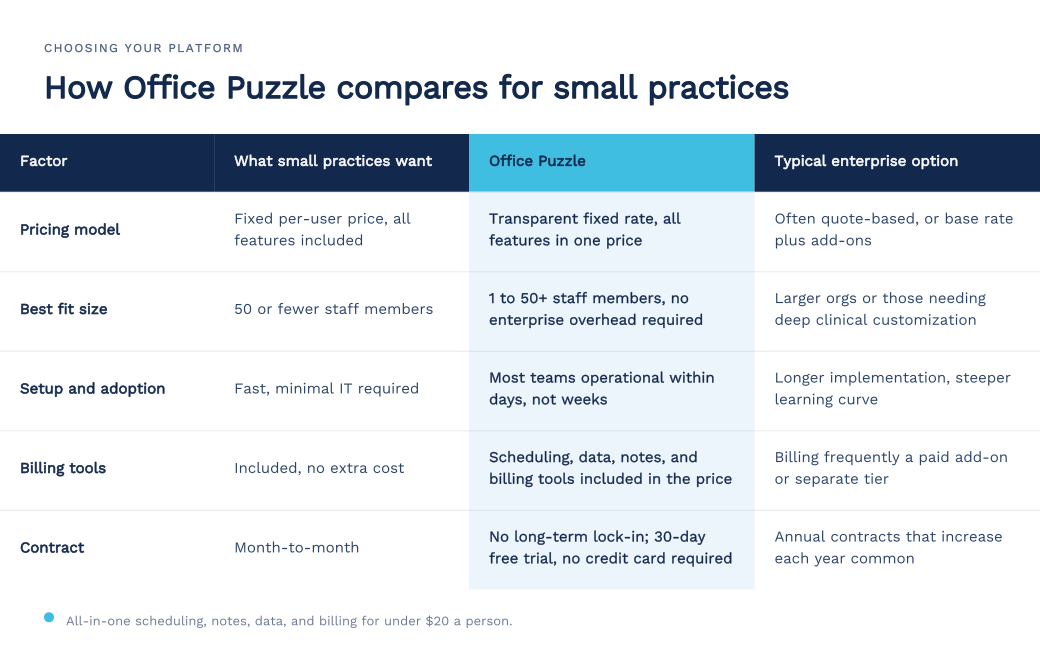
Small-practice comparison at a glance
Finding the right fit for a smaller practice doesn't have to be complicated. We’ve mapped out the core features and terms you should look for in a new platform. Be sure to verify the latest specifics directly with individual vendors before deciding.
Why Office Puzzle was built for small practices
Office Puzzle was built for one RBT who needed an all-in-one ABA solution that was accessible, affordable, and simple to implement. The platform now serves more than 800 practices nationwide and is simple enough for one person wearing multiple hats to manage and robust enough to support teams of 50 or more users without added complexity or surprise costs.
Here is what that means in practice.
One transparent price, all features included. Scheduling, data collection, session notes, and billing tools in a single per-user fee. No per-client charge on top of a per-staff rate. The number on the pricing page is the number you pay.
Fast to adopt. Most teams are fully operational within days. Clinicians find the interface intuitive, and the full platform is available on any device, supporting in-home and community sessions, no work-arounds needed.
No long-term commitment. Month-to-month with a 30-day free trial and no credit card required. Office Puzzle is the only ABA software offering a truly risk-free trial where you can access all platform features in your own environment. You validate fit with real data before committing to anything.
Compliance built in. HIPAA-compliant data handling, EVV support for applicable Medicaid services, and authorization tracking with renewal alerts are standard features, not upgrades. For a practice without a dedicated compliance officer, that matters.
Support from people who understand ABA. Not a general software ticketing system. Support from people who know how session notes, Medicaid billing rules, and BCBA supervision requirements actually work.
When an enterprise platform might be the right call
An enterprise platform makes sense if you need highly customized clinical programming and if you manage a massive network across multiple states.
However, that doesn't describe most growing practices. For the rest, the math clearly favors an all-in-one platform. You get the everyday tools you need, at a predictable price, without paying for massive overhead.
Rather than asking which platform has the most features, the better question is which platform fits your daily operations without holding you back.
The bottom line
The best software for a growing clinic is one that keeps things simple. You deserve flat rates, quick setups, and the flexibility to scale on your own terms.
We designed Office Puzzle to be that perfect fit. See how it works for your team by starting a 30-day free trial with no credit card and no obligation. You can also book a live demo today, and we will show you how the system seamlessly connects your daily operations.
Frequently Asked Questions
What is the best ABA software for a small practice?
For most small ABA practices, an all-in-one platform designed for their size is a better fit than an enterprise tool. The right platform covers scheduling, data collection, session notes, and billing tools in one affordable system that is fast to adopt. It should offer:
- transparent, per-user pricing
- all features included
- no long-term contract before your team has validated the fit
- responsive support from people who understand ABA workflows
Office Puzzle was built specifically for this segment.
How does ABA software pricing actually work?
The advertised base rate rarely tells the whole story. Some platforms, like Office Puzzle, charge a simple, flat fee for each user with every feature included. Others charge you per staff member and then stack an extra fee on top for every active client. You might even find companies that charge separately for individual tools like billing or data collection. Before you compare options, always ask for the total monthly cost based on your actual team size and caseload.
How long does it take to switch ABA platforms?
It depends on data volume and how integrated your current tools are. All-in-one platforms designed for small practices generally onboard in days to a couple of weeks. Enterprise systems typically require months. A free trial with real data is the most reliable way to verify the fit before you commit. It tells you far more about how your team will actually use the software than a staged demo ever could.
Do I need separate billing software?
Not if your practice management platform includes billing tools. When signed session notes flow directly into your billing workflow, you eliminate the manual re-entry and documentation errors that drive claim denials. Watch for platforms that treat billing tools as a paid add-on. They can change your monthly cost and add another system boundary where errors can occur. Note that billing tools are different from a managed billing service, where a third party handles claims on your behalf for a percentage of collections. Office Puzzle provides billing tools built into the platform so your team can submit claims to the clearinghouse of your choice at no extra cost.
How is ABA software different from general medical practice management software?
General electronic medical records and practice management tools are built around medical visit workflows that do not map well to ABA. Specialized ABA software matches the actual rhythm of your clinic. It streamlines everything from behavior intervention plans to daily session data collection for your RBTs. It takes the stress out of compliance by tracking supervision ratios and handling EVV for covered in-home services. It also simplifies your revenue cycle with built-in Medicaid prior authorization tracking and standard ABA CPT billing codes. Using a general medical tool for an ABA practice typically means workarounds, manual re-entry between systems, and documentation that does not meet ABA payer requirements without customization.